Tech Stack
Java Spring Boot, Spring Data JPA, Hibernate, PostgreSQL, and ReactJS
Why and What?
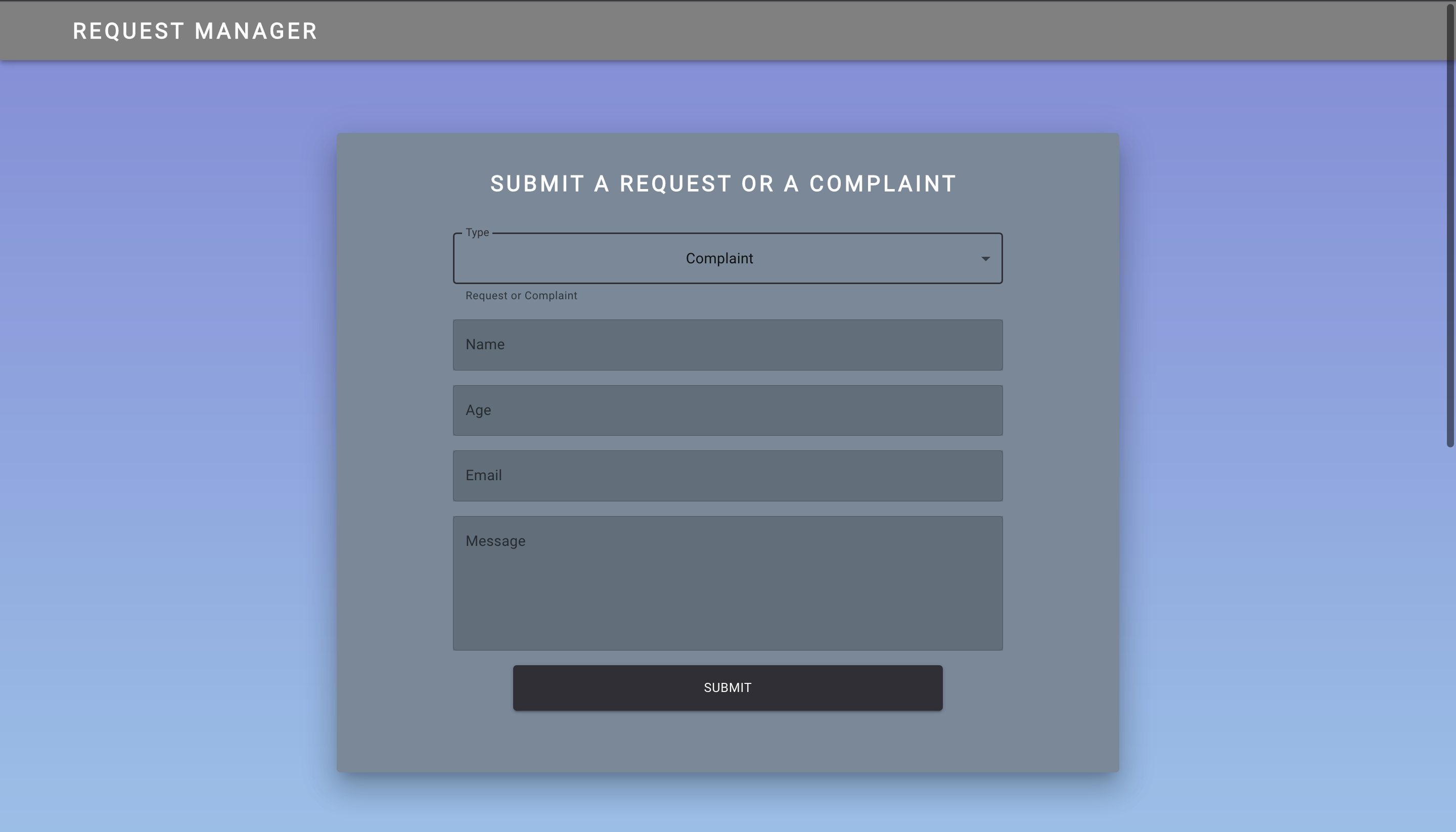
Starting my internship this past week, there was a small problem: my project tech stack included Java Spring Boot, and I have never coded in Java before. In all honesty, I’ve seen so many Java programming memes, I thought it wasn’t worth learning the language. To my surprise, however, it only took about one day to learn and get really comfortable with Java - and I really like it. To test if I could make something somewhat practical in Java, I decided to make a RESTful API connected to a PostgreSQL database with a ReactJS front-end. I didn’t want to make a simple todo app, so I decided to make a request manager that managed a pseudo-company’s requests and complaints from users. Users can fill out a form with their name, age, email, and write their message. They can also see all requests & complaints that are in the database. The pseudo-company is able to remove a request || complaint if they wanted to with a DELETE request.
Back-end (Spring Boot and PostgreSQL)
Since this is a pretty simple application, the backend wasn’t too complicated. I spun up a Spring Boot project, and made a couple of components:
- Request Model
- Request Controller
- Request Repository
- Request Service
- Request Service Implementation
and in my resources folder, I connected the project to my PostgreSQL database in the application.properties file.
PostgreSQL, JPA, & Hibernate
In order to map the Java Objects to the PostgreSQL database, I used Sprint Data JPA and Hibernate. JPA (Java Persistence API) is a specification for mapping native Java objects to database tables. Hibernate is a JPA Provider and an ORM (Object Relational Mapping) tool that provides the actual implementations of the specifications. Hibernate saves programmers from manually handling persistent data. Spring Data JPA is just another layer on top of JPA that allows users to define DAO (Data Access Objects) interfaces by extending its repositories (I used JpaRepository).
Components
Request Model
The request model is the actual Java class that represents the request/complaint table in the database. I used the JPA annotations @Entity and @Table to actually tell the program that I want to map it to a table. Inside the class I have a couple of attributes that define the columns in the table (id, type, name, email, age, message). The id field must be annotated with the @Id JPA annotation as that specifies it as the primary key of the entity. I then annotated the id with @SequenceGenerator and @GeneratedValue to automatically generate a unique ID every time a request is submitted:
    @SequenceGenerator(
            name = "request_sequence",
            sequenceName = "request_sequence",
            allocationSize = 1
    )
    @GeneratedValue(
            strategy = GenerationType.SEQUENCE,
            generator = "request_sequence"
    )
For the message attribute, I could not simply just store it as a string as PostgreSQL maxes out strings (VARCHARS) at 255 characters. Therefore, I had to annotate it with @Column(columnDefinition = "TEXT") which can hold a string with a maximum length of 65,535 bytes. The rest of the Model class just consisted of getters and setters of the attributes.
Request Repository
If you remember from earlier in the text, I used Spring Data JPA so that I can extend its JpaRepository. A repository is basically a mechanism for encapsulating storage, retrieval, and search behavior which emulates a collection of objects. The JpaRepository contains the full API of CrudRepository and PagingAndSortingRepository, so it contains all of the APIs for basic CRUD operations.
public interface RequestRepository extends JpaRepository<Request, Integer>{}
Request Service & Request Service Implementation
The request service serves as a service layer that handles all the business logic. I first created a interface RequestService which contained all of the functions of the service. I then created a RequestServiceImplement class that actually implements the interface. The request repository that I made is @Autowired into the service implementation. It contains functions like saveRequest which takes a instance of the Request model and saves it into the database through the repository. It also has a getAllRequests function that returns a list of all the Request instances in the repository (database). To remove a request from the database, there is a removeRequest function that takes an id and then checks the database (through the repository) if a request with that ID exists. If it does then it deletes it, otherwise it throws an IllegalStateException.
Request Controller
The request controller handles the actual RESTful API operations. It is annotated with @RestController which allows the program to handle RESTful operations like GET, POST, DELETE, and PUT requests. The request service (business logic) is @Autowired into the controller. To handle a POST request, I created an addRequest function that is annotated with @PostMapping. The function takes in the Request Body and deserializes it into a instance of the Request model. It then calls the saveRequest function from the request service with the deserialized request as the argument.
@PostMapping
public void addRequest(@RequestBody Request request) {
    requestService.saveRequest(request);
}
To handle a GET request, I created a function getAllRequest which is annotated with @GetMapping. The function simply calls the getAllRequests function from the service.
@GetMapping
public List<Request> getAllRequests() {
   return requestService.getAllRequests();
}
To handle DELETE requests, I created a function called removeStudent that is annotated with @DeleteMapping(path = "{requestId}"). This is because unlike the GET and POST requests, when a user is trying to delete a request they must add the id number to the URL path. Because of this the removeStudent function takes in @PathVariable("requestId") int id as a parameter. This allows the program to take the id number the user sent the DELETE request to and actually delete that id number from the database. This function calls the removeRequest function from the service.
@DeleteMapping(path = "{requestId}")
public void removeStudent(@PathVariable("requestId") int id) {
    requestService.removeRequest(id);
}
So a user could use Postman or curl to delete a user from the database
curl --request DELETE http://localhost:8080/api/v1/request/1
Front-End (ReactJS)
The front-end was created with ReactJS. I have some experience with React but I am not exactly an expert. My goal for this project was to just create a somewhat visually pleasing UI, and I’m really happy with the result. Talking about Front-End implementation isn’t too interesting so if you want to see my code, check out my GitHub repo. I used Material UI for some pre-built components like Container, TextField, etc… and my main component was Request. I created states for the name, age, email, message, and type. Whenever the user typed something into the text fields, the corresponding state setter function would be called
...
    value={name}
    onChange={(e) => setName(e.target.value)}
...
The only attribute that was different was age. Whenever the user changed the age, the program would call the ageHandler function.
const ageHandler = (e) => {
    // Handling if user does not input valid age
    const { value } = e.target;
    if (isNaN(value) || parseInt(value) > 150 || parseInt(value) < 0) {
        alert(value + " is not a valid age. You must enter a valid age!");
        setAge("");
    } else {
        setAge(value);
    }
};
This function basically checks if the number the user inputed is a valid age and acts accordingly. I then had a handleClick function for whenever an user pressed the submit button.
const handleClick = async (e) => {
    e.preventDefault();
    const request = { type, name, email, age, message };
    try {
        await fetch("http://localhost:8080/api/v1/request", {
            method: "POST",
            headers: { "Content-Type": "application/json" },
            body: JSON.stringify(request),
        });
        console.log("Request added");
    } catch (e) {
        console.log(e);
    }
This function captures whatever state the type, name, email, age, and message are in and stores it in request. It then tries to send a POST request to the url specified in the Java Request Controller file with the request as the body. If successful, it will add the request into the PostgreSQL database. If there is an error, it is simply caught and logged on the console.

To display all of the requests from the database, I created a fetchData function in the useEffect hook.
useEffect(() => {
    async function fetchData() {
        try {
            const response = await fetch(
                "http://localhost:8080/api/v1/request"
            );
            const data = await response.json();
            setRequests(data);
        } catch (e) {
            console.log(e);
        }
    }
    fetchData();
}, []);
This function will try to send a GET request to that same link and turn it into JSON (if you remember, when the controller gets a GET request it will return a list of all the request instances in the database). If successful, it will change the state of requests to the list that is returned. If it fails it will catch the error and log it on the console. Putting this function in the useEffect hook allows the table to be updated every time the page is refreshed.

Reflection & Future
Since this project was more of a way to implement my newly-found knowledge of Java, it wasn’t too complicated. However, I am very pleased with the result. To my surprise, I actually really enjoyed making a back-end with Java & Spring Boot, and I may do a bigger personal project with it. I’m not sure though because I do want to explore some Python web frameworks (Tornado, Quart, FastAPI) next as I’m really only fluent with Django.